
Grab - Taxi & Food Delivery
Grab HoldingsTravel & Local
4.812.13K Reviews
- Version
- 5.436.0
- Installs
- 100.00M
- Age Rating
- Everyone
Screenshots
Our Review of Grab - Taxi & Food Delivery
 Analysis by Appyee
I think Grab - Taxi & Food Delivery makes the most sense when you treat it as a practical hub for everyday errands rather than expecting every service to be equally useful everywhere. I’d open it when I need to arrange a ride, sort out a meal, or check whether another local service is available. That flexibility is the real appeal; the trade-off is that the experience depends on what operates in your area and how busy things are at the moment.
A routine that keeps the app useful
For a first-time user, I’d begin with one straightforward task: enter a pickup and destination for a ride, or browse nearby food options before deciding what to order. Getting comfortable with those basics makes the larger range of choices less distracting. The app is free, and Grab Holdings is the developer. Its Travel & Local focus is apparent in the way transport and daily delivery fit together, though the app’s value is strongest when those services are available where you actually spend time.
A helpful habit is to check the important details before confirming instead of tapping through on autopilot. For a ride, review the pickup point, destination, available option, and displayed fare. For food, check the restaurant, selected items, and order details. I find this small pause more useful than trying to hurry through every screen: a correct pickup or order matters more than saving a few seconds and needing to fix a mistake later.
Make settings and choices work for you
The best setup is less about hunting for obscure tricks and more about making deliberate choices each time. Keep the destination and pickup information accurate, choose a payment method that suits the situation, and read the terms shown for the service you are about to use. Payment options can differ by place and transaction, so I would not assume the same method will be available for every ride or delivery. Checking at the point of booking avoids an awkward surprise.
Notifications can be useful when they tell you something actionable, such as a change in the progress of a ride or food order. I’d allow the alerts I rely on, then adjust or silence anything that becomes noise. That balance matters especially if you use the app for several kinds of tasks: useful updates help you keep track, while constant interruptions can make a convenient tool feel demanding.
Small habits that save effort
When I know I’ll need a ride at a particular destination, I prepare the location carefully rather than waiting until I’m standing in a crowded or confusing spot. If the map pin looks off, I correct it before confirming. This is a simple way to reduce avoidable back-and-forth, and it is more valuable than rushing through the booking screen. For food, I take a moment to review the basket before placing the order, especially when ordering for more than one person.
Grab can also be handy when a day changes shape. Imagine leaving work, realizing you need a ride across town, and then arranging dinner while you travel. Keeping both tasks in one app can reduce app switching, but I’d still complete the ride details first and check the food order separately. Treating them as two distinct decisions helps avoid mixing up addresses, timing, or payment choices.
Where convenience has limits
An all-in-one app does not mean every service will be the best fit for every need. Local availability and busy periods can affect the options you see, and a broad selection is not a guarantee that a particular restaurant or ride type will suit you. I would compare the displayed choices and total cost with another local service when price, timing, or a specific provider matters more than keeping everything in one place.
There is also a practical difference between a platform that helps arrange a service and the service itself. A driver’s route, traffic, restaurant preparation, and delivery conditions can shape the result. Tracking and status updates are useful for staying informed, but they cannot make a congested trip fast or ensure that every order arrives exactly when you hoped. I find it best to use the estimates as planning guidance, not a promise that removes uncertainty.
Getting Started with Grab
First things first, downloading Grab - Taxi & Food Delivery is a breeze. Available for both Android and iOS, I found it in the app store, hit download, and in no time, I was set up. The registration process is straightforward—just a few taps, enter your details, and you’re good to go. One thing I appreciated was the app’s clean and intuitive interface. It doesn’t overwhelm you with too many options at once, which is great when you’re trying to book a ride in a hurry.
Booking a Ride
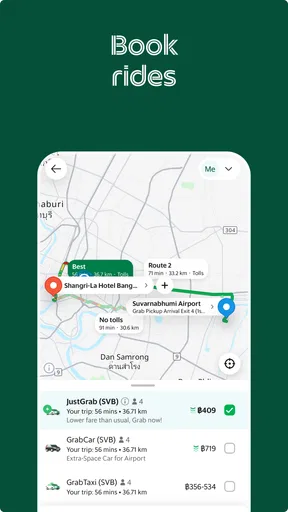
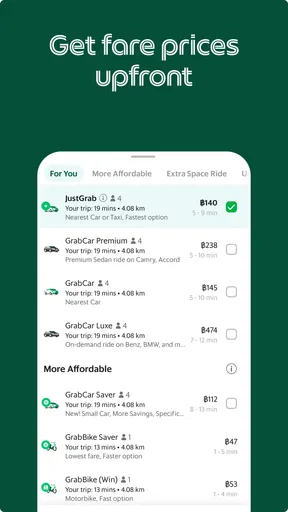
Booking a taxi through Grab is as easy as pie. You input your pick-up and drop-off locations, and the app quickly gives you a list of available ride options. Whether you’re looking for a budget ride or something a bit more plush, there’s something for everyone. I particularly liked the upfront pricing feature—no surprises when you reach your destination. The real-time tracking is super handy too, letting you see your driver’s ETA and route.
Food Delivery Experience
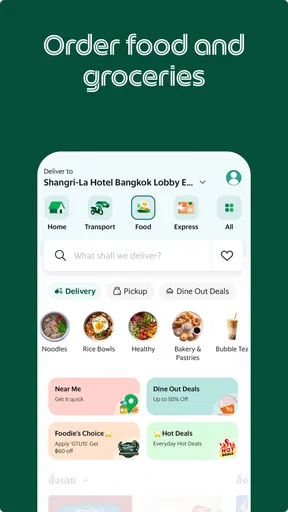
Now, onto the food delivery part—because who doesn’t love food, right? Grab offers a wide variety of restaurants, ranging from fast food to fine dining. Browsing through the app, I found it easy to filter options based on cuisine, ratings, or price range. Once you place your order, the app keeps you updated with every step, right until your food arrives. It’s like having your favorite waiter right on your phone.
For a shared meal, I’d use those filters to narrow the choices before adding anything to the basket. That gives everyone a chance to agree on a cuisine or budget before the final order is submitted. If one person is covering the bill, checking the completed basket first is particularly worthwhile: it catches duplicate items, missing drinks, or an unintended choice while there is still time to correct it.
Additional Features
One of the standout features of Grab is its versatility. Beyond rides and food, it offers services like parcel delivery and even grocery shopping in some regions. It’s a one-stop-shop for many of your daily needs. The rewards system is also a nice touch, allowing you to earn points with each transaction that can be redeemed for discounts or freebies. Who doesn’t love a good deal?
I’d treat those extras as useful possibilities, not as a reason to assume every service is present in every location. Grocery shopping or sending a parcel may be a good fit when the relevant option appears and the timing works; otherwise, a dedicated local provider could be easier. The same goes for rewards: they are a bonus when they apply to something you already planned to do, but I wouldn’t choose a less suitable ride or meal just to chase points.
User Experience and Support
In terms of user experience, Grab does a commendable job. The app rarely glitches and performs smoothly even during peak hours. If you ever run into issues, the customer support is just a message away, responsive and helpful. I had a minor hiccup with a ride once, and the resolution was swift and satisfactory.
If something does go wrong, I’d keep the relevant order or ride details handy and explain the issue clearly through the available support channel. That is more productive than sending a vague complaint, especially when the concern is tied to a particular trip or delivery. Even a responsive support experience cannot remove every inconvenience, so I still recommend checking key details before confirming rather than relying on support to correct preventable errors afterward.
Security and Payment Options
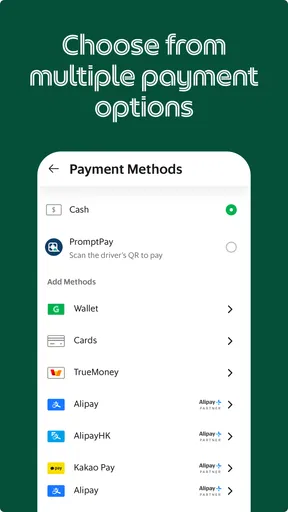
Security is a big plus with Grab. The app supports multiple payment options, including credit/debit cards, cash, and digital wallets. I felt safe using it, knowing that my payment details were secure. Plus, the driver information and vehicle details provided before each ride offer an added layer of safety.
Before getting into a booked car, I’d compare the driver and vehicle information shown in the app with the vehicle that arrives. That is a sensible check, not a substitute for paying attention to your surroundings. For payments, choosing a method you can comfortably manage makes the trip simpler; if you are unsure which options are supported for a particular booking, the choices presented during checkout are the ones to follow.
Who will get the most from it
Grab is a strong fit for someone who regularly needs both local transport and convenient delivery, and who appreciates having those tasks in one familiar place. It is also useful for visitors in a market where Grab operates: one app can help with a ride and a meal without learning several separate interfaces at once. The broad user base is reflected in its 4.8 average from around 16 million ratings, and it has passed 100 million installs. Those figures suggest wide adoption, though they cannot tell you which services are available on your own street.
I’d be less enthusiastic about recommending it as a sole option to someone who depends on a very specific ride provider, a particular restaurant, or a delivery service that is not represented locally. Someone who rarely orders food or uses booked rides may also prefer individual apps they already know. Grab is most convincing when its combination of services saves real effort, not simply because it can do several things.
What to expect before relying on it
The app is rated for Everyone, and its current version is 5.413.0, with Android 7.0 as the minimum operating system requirement. It has been available since May 30, 2013. Those basics help answer whether it fits your device and household, but the more important practical question is local coverage: open the app and see whether the service you need is offered at your pickup point or delivery address before building your plans around it.
Compared with using separate ride-hailing and food-ordering apps, the clearest advantage is convenience and a shared starting point. Separate services can still be preferable when they show a better local selection, a more suitable provider, or terms that work better for a specific order. I’d keep Grab as a useful everyday option and compare when the decision matters—especially for an unfamiliar destination, a time-sensitive journey, or a larger food order.
Overall, Grab - Taxi & Food Delivery stands out as a versatile and user-friendly app. Whether you’re in need of a quick ride or craving a delicious meal, it delivers (quite literally) on its promises. It’s like having a Swiss Army knife of services right on your smartphone. Give it a try, and you might just find it hard to imagine life without it!
A practical final judgment
My recommendation is to use Grab with a repeatable routine: confirm the location, scan the options, check the total and details, then follow the trip or order in the app. That makes its strongest qualities—convenience, choice, and progress updates—work for you without asking it to control traffic, local coverage, or every part of a delivery. If it serves the places you go and the services you actually use, it can earn a regular spot on your phone; if not, a focused local alternative may be the smarter choice.
Privacy and Permissions
See what permissions an app requests and how it handles your data.
- Identity
- find accounts on the device, read your own contact card
- Calendar
- read calendar events plus confidential information, add or modify calendar events and send email to guests without owners' knowledge
- Contacts
- find accounts on the device, read your contacts
- Location
- approximate location (network-based), precise location (GPS and network-based)
- Phone
- directly call phone numbers, read phone status and identity
- Photos/Media/Files
- read the contents of your USB storage, modify or delete the contents of your USB storage
- Storage
- read the contents of your USB storage, modify or delete the contents of your USB storage
- Camera
- take pictures and videos
- Microphone
- record audio
- Wi-Fi connection information
- view Wi-Fi connections
- Device ID & call information
- read phone status and identity
- Other
- view network connections, pair with Bluetooth devices, change network connectivity, connect and disconnect from Wi-Fi, control flashlight, measure app storage space, full network access, change your audio settings, control Near Field Communication, read terms you added to the dictionary, run at startup, reorder running apps, draw over other apps, control vibration, prevent device from sleeping, install shortcuts, read Google service configuration
Verdict
Strengths of Grab - Taxi & Food Delivery
- User-friendly interface simplifies bookings.
- Offers a wide range of services.
- Real-time tracking enhances safety.
- Seamless payment options available.
- Loyalty rewards for frequent users.
Limitations of Grab - Taxi & Food Delivery
- Surge pricing can be unpredictable.
- High data usage for app operation.
- Occasional GPS inaccuracies.
- Limited availability in rural areas.
- Customer service can be slow.
Similar Picks in This Category
View All
Google Maps
Google LLC3.4

Google Maps Go
Google LLC4.1

Booking.com: Hotels & Travel
Booking.com Hotels & Vacation Rentals4.8

Google Earth
Google LLC3.8

Skyscanner Flights Hotels Cars
Skyscanner Ltd4.8

trivago: Compare hotel prices
trivago N.V.4.4
Frequently Asked Questions
What services does the Grab app offer?
Grab is a versatile app offering a range of services beyond just transportation. It includes taxi and ride-hailing services, food delivery, grocery shopping, and even package delivery. Users can also access GrabPay, a convenient cashless payment option within the app, making it a comprehensive solution for daily needs.
Is Grab available in my country or city?
Grab primarily operates in Southeast Asia, including countries like Singapore, Malaysia, Indonesia, Thailand, Vietnam, and the Philippines. Availability can vary by city within these countries. Before downloading, it’s best to check the app store or Grab’s official website to see if services are offered in your specific location.
How does Grab ensure the safety of its users?
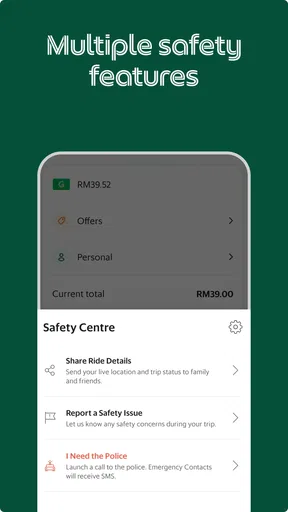
Grab prioritizes safety with features like in-app emergency buttons, real-time ride tracking, and driver verification processes. It also includes a safety center where users can find tips and guidelines. Regular updates and feedback mechanisms help maintain high safety standards for both drivers and passengers.
What are the payment options available in Grab?
Grab offers multiple payment methods to accommodate different user preferences. These include cash, credit/debit cards, and GrabPay, the app’s own digital wallet. GrabPay allows for seamless cashless transactions, and users can earn rewards and promotions through the app’s loyalty program.
Can I schedule rides or deliveries in advance with Grab?
Yes, Grab provides the option to schedule rides and deliveries ahead of time. This feature is particularly useful for planning airport transfers, early morning commutes, or ensuring timely food deliveries. Users can set the desired date and time, and Grab will handle the rest, ensuring convenience and reliability.
